Do you like my blog?

2leep.com
------------------------------------------------------------------------------------------------------------------------------------------------
First time on my blog "Unblock Blocked Site"? Learn more to Unblock Blocked Site with the help of different software.


Subscribe to blog updates by Email or RSS

Each week you will get news related to the topic of blocked sites unblocking . I promise you, my dear reader! Or you will unsubscribe :-)

Firstly, look at my 7 ways to unblock blocked sites. You will like it.
-------------------------------------------------------------------------------------------------------------------------------------------------
Showing posts with label Unblock Blocked Site tips. Show all posts

Going Dark, part 1. or How to unlock blocked websites if SOPA (or similar act in the future) is to come.

“Darknet” or “Deep net” is a collective term which refers to the so-called “deep” part of the Internet, part that is inaccessible without special software, cannot be seen from the Internet, and not indexed by web crawlers (such as Google).

Darknet networks are supported by people who volunteered to help others in need of unblocking blocked websites by donating their bandwidth to them.

For example:

I live in China, and one day great firewall bans my favorite website, what do I do? I could use proxies, but what if the proxies sites are banned too?


That's where software comes in, let's talk about one of many p2p anonymous networks, “Tor” network.

It works by the “relaying” traffic through people who volunteered their bandwidth, and completely anonymous.

One must go to Tor download page https://www.torproject.org/download/download-easy.html.en and download client. Follow the instructions carefully and especially the part where it says “Want Tor to really work?”, because that's the most crucial one.
Next, you open up the Tor client and decide what exactly do you want. If you simply want to browse you can start right away just by starting Tor browser (not your regular one) and going to the website you need. You'll browse anonymously and 99% of the time website that was blocked now is available to you. If not – you can always quickly re-connect to tell Tor to find new relay for you, and then you'll likely to access blocked website anyway.

For blocked websites Tor provides anonymous access to them, and lack of need to find proxies over and over only to find them not working. Tor IS an unending proxy to access blocked websites, and you can change your relay (person through which you direct your traffic) instantly there.

Is Tor completely anonymous? Yes and No. In order to “track” someone in the network one would need a supercomputer and lots of bruteforcing to do. So as long as you're doing something that is not terribly illegal – you'll be just fine.


If you however want to discover the “Deepnet” or “Darknet” you should go to the Tor wiki page that contains almost all of the Tor websites and services.

Let me just get this giant elephant out of the room first that you may or may not heard:

Yes, you can find lots of illegal materials on Tor network, just as you can find them on the Internet, but unlike internet you need to specifically try and find them.


So let's conclude it, why or why not someone should/shouldn't use Tor?
Pros:

  • Relatively easy to set up if you just want to browse the Internet anonymously.
  • You can see the famous “Deep” Internet and its resources with many websites, communities and all sorts of information.
  • You can be a part of huge growing community or even a volunteer that helps others.
  • It's a necessity if you're suddenly out of options and SOPA (or similar passed act) came.

Cons:
  • The network access is somewhat slow, and depending on the relay you chose to access (you can always change it in seconds) it can be REALLY slow.
  • ISPs can always ban the relay part and you'll not access the “outter” Internet (the one that you're reading this article on).
  • The concept may be confusing for newcomers, but with the available guides with screenshots that shouldn't be a problem.


Let me tell you what you think in the comments. Are you already a Tor user? Did this article convince you to try it? Maybe you know something that is even better than Tor? If so – do tell, would love to hear it!
We'll talk about even more “darker” deep Internet in the next part, stay tuned!

12 possible ways to unblock blocked sites

It has become known that UAE ISP preferred to block its popular community sites in Orkut.

Since that moment has become a lot of request for unblocking it in order to get touch with the world.

Here 12 techniques how to unblock blocked sites:
1. Usage mobile sky fire browser, checking out the post for getting more details.
2. Uploading the files to server (rapidshare).Downloading pagemond from rapidshare. It hrlps to unblock the totally blocked world.
3. Usage of fringe for unblocking orkut or facebook while using mobile.
4. Get the chance to browse sites at workplace. Bypass the Etislat and you will see that works are excellent when you get it in the office. Remember if you download the link t won’t work at the given blocked area everything depends on the settings in it.
5. Look up from time to time to commenter at the blog which writes about latest up -dating concerning proxy websites.
6.Download zip file, then you need to open the html file in Mozilla firefox browser, it will improve the working process. State your mind on that the link one can download s at the second point.
There must be a box in the html file , you can find these types of website addresses and with their help unblock all you need.
7. Browse website without visiting a proxy site. It is possible to find proxies at point 9. Download firefox by transferring a link (one can see it in the internet explorer). Then search the toolbar extension from here. It will add the proxy websites on the browser .
8. Pass to the weblog by ashwin, it will direct you trough vpn connection to get the blocked websites.
9.Best alternative if not blocked– Powerscrap.com.
10.Then be aware of smex.in, pagemod.com , pmoder.info . These are the best proxies for browsing orkut. Now they have become moderated with innovative solution.
11. Opera mini simulator may help. Visit this link of opera mini simulator in order to get access of blocked website.
12.Pass to download.com or softpedia.com and to search for software by keywords “anonymous browsers”. There you will get various software and toolbars, which will route your data through country server like Indonesia ,China etc.

These are possible ways to unblock blocked sites. More detailed information and instructions you can get at the specialized websites or requesting the professionals like Arovax LLC. Happy unblocking.


Liked this post?Why not to Subscribe to Unblock Blocked Site news by Email for FREE

Bypassing Blocked Sites Gives More Freedom

The notion bypassing blocked sites lies is being regarded scientifically. It has been studied numerously. That’s why have acquired the status of the special science. One can find great number of publications on this theme. Let’s take for example Raene Kaleinani began to study it professionally in 2009.

Bypassing concerns different internet notions and terms. For example bypassing of the firewall and getting the access to the blocked site. It may be done in private place in any type of hot spot, for example in school, at work, at the university. Imagine you are trying to get the access to some site but receive only cancelling of the operation. It is the consequence of the firewall activity. The web access is being greatly restricted by the big companies during the work time, by the university , by the educational systems for variable reasons. There is nothing to do except to follow the rules. But do not get upset it is simple to avoid.

Follow the instructions:

  1. First of all: press the option “Start”, then follow to the next option ”All programs”,, then again press one more option “Command Prompt” afterwards you will see the opened command blank.
  2. The second action is as follows: type “ping” and type the URL you want to access, then press the option “Enter”. But you are to know it won’t do following the quotation marks.
  3. Searching IP address of the website that you have just entered is also recommended. The last action to do is to enter the password as t is displayed in the prompt log of your browser.

As for static information that does not change for the long period of time the best way of bypassing blocked sites is searching for the cached link. The best searching engine for these kinds of operations is Google.

There are a lot of forums where advanced user will help you to decide this difficulty in this or that way. Every user has its own opinion concerning the given situation. Every of them are proved in their words. Some of them advice to use so popular nowadays proxy but it is not the best way out.

Some users how are good informed try to Use VPN service, of course it is also a good option to be applied but everything depends on the situation and on the personal data of your computer.


Liked this post? Why not to Subscribe to Unblock Blocked Site news by Email for FREE

Is that Possible to Unblock Sites in Qatar?

Middle East situation makes many east countries’ government reconsidering its policy towards the internet connections. The information leakage leads to the blocking many political and social sites which provide the inner situation information to the world. Let’s take the Qatar, it Arabian country with high number of blocked sites, the information being blocked varies. Internet censorship feels highly. But there is a way out to unblock sites in Qatar.

Qatar official prefer to block even social networks, for example such sites as Facebook, YouTube, it’s all because high risk and criminality in which Qatar population is involved. All the channels are referred to blocking even mobile chatting. The government has a monopoly for it. The same happens with VoIP services for example Skype.

Considering the situation in Qatar helps us in understanding why does it happen. Country’s law system does not allow to access to restricted sites and some network systems. Meanwhile users in other countries have a full freedom in their web transactions. What is the reason of such situation?

The reason is that changing your IP address in Qatar home or office computer one automatically gets the unblocking for some sites while in other countries it’s just the other way out.

In this case the best outline is acquiring the VPN (Virtual Private Network). You may hide your IP differently : changing the address, buying the proxy, but you are to remember that proxy will not provide stable connection, sometimes there can be some pitfalls: low connecting or traffic falling down at all. That’s why they are not so reliable as VPN.

Its service contributes creating the special secure channel or some kind of tunnel with its own ip address which is invisible. This VPN account can really unblock sites in Qatar easily.

What are you to do to acquire it? First of all you are to create private connection, server, than you are to create VPN tunnel , making a link between the server and Pc and setup a guide.

VPN technologies will make your connection secure and high speed, the traffic will be encrypted.

If you have some other questions concerning the ways of unblocking sites of high query for you then address the qualified specialist in the area.

Liked this post?Why not to Subscribe to Unblock Blocked Site news by Email for FREE

6 Old Proved Ways for Unblocking Blocked Sites

The situation around blocking web sites stays indifferent for many web users nowadays. Definite Asian countries prefer to block sites of different content which is not allowed in countries regarding to this or that aspect of life. But everyone wants to unblock blocked site.

The list of prohibitions may be rather wide: sexual issues, large and small companies, sites concerning security breaches and so on. Violations are mostly is a ground for prohibition and constitute certain rules for schools and university web attendance. But sometimes appear some kind of situation when you immediately need to appear in the particular site but have no opportunity at all.

In this situation one should apply the following methods:
1. Apply an IP address instead of typing it in the place where the domain name should be.
Typing the specific domain name won’t do , instead of this you are to place the signature address in your computer while it is connected to the web. Using such tools as Netcraft, Whois domain tools will help you to find the ip address of any desirable site.

2. Usage of mobile Web
One can get the mobile version of the blocked site. Mobile version of the phone on your computer can also be useful.

3. Google Cache to find a version of a site
Google’s cache is a good way to see a site that was blocked. Navigation of goggle’s home page will obviously lead you to the site required.

4. Usage of an anonymous web proxy
This proxy hides your identity from the sites being attendable. When you apply a web proxy to visit a blocked site, ip address will be obviously hidden. The anonymous proxy compound the ip address for own purposes. It means that if the place of your living restricts you visiting certain sites you will get a chance to apply the web proxy, but if you happened to find yourself in such situation being abroad then you are to it help there too. Web proxies also encode URLS that you are visiting, which all makes the history of your site attendance untraceable.

5. Usage of translation service
Big cities have more than one language version in their content. It can be found easily by favorite searching engine. The text in foreign languages can be translated to your language since you have found them.

6. RSS reader
It can be used to subscribe to the sites you prefer to see of course if there is a special RSS feed.

The possibilities of searching in the sphere of feed reader of the site are great.

And in the end, I add one more Modern and Easy way of hidding real IP - this is SmartHide. It will help you to unblock blocked site in any spot of the planet. It has portable edition that you can store on USB where ever you go.

Liked this post?Why not to Subscribe to Unblock Blocked Site news by Email for FREE

Guide: How to Defeat US DNS Censorship (Using Foxy Proxy)

Our guide series continues with another FireFox plug-in called “Foxy Proxy”. It’s a bit like Tor only you are not connected to a huge network of proxies, but rather, using a single proxy to access the internet. While arguably less secure than using Tor, for using it simply to bi-pass DNS censorship (or even using it to bi-pass geo-blocked websites for that matter), it can be sufficient enough to accomplish simple browsing tasks.

It’s entirely possible that you’ve seen the odd conversation here or there online that had someone say, “Oh, you can just use a proxy for that.” Don’t think you are alone if you felt that it seems easier said than done because you don’t know where to begin. Don’t worry, this guide should show you one way of connecting to a simple proxy.
Using a vanilla proxy can do a few things. One thing is to defeat DNS censorship as suggested in the PROTECT-IP Act. The other is accessing a geo-blocked website. The only difference is that if it’s a censorship thing, simply access a proxy outside of your country. If it’s a geoblocked website, then simply find a proxy within a country that is allowed on that particular website. That’s really the only difference. Don’t worry, just read on if all this sounds confusing. This guide should cover it all.
This guide presumes you are using FireFox. Foxy Proxy for other browsers is apparently in the works, but it appears to be only for FireFox at this time.
Step 1: Download and install Foxy Proxy
Since Foxy Proxy is a plug-in for FireFox, this should really be the easy part. Go to the plug-in download page. Click on “Continue to Download”. On the next page, click on “Add to FireFox” You’ll likely get the following pop-up window:
Click on “Install Now” when the button allows you to. Once it’s installed, you’ll get the following pop-up:
Clicking on “Restart Now” will restart your browser.
Step 2: Find a Proxy
Unlike Tor, you actually have to track down some proxies to use manually. Right now, you should be behind no proxy at the moment when FireFox restarts.
Your Foxy Proxy plug-in should be found to the right of the URL (left of the Google search bar) It’s the little blue fox icon:
Right click on the blue fox and click on “Options”
What you’ll get is the following screen:
The default proxy is merely you. You aren’t really behind any kind of proxy at all. The next part is finding a proxy. There’s to routs one can go here – either using a paid service (generally more reliable) or a free service (more convenient). Paid proxies can be found on the Foxy Proxy website.
For testing purposes so we have an idea of what we are getting in to, we’ll use a free one for now. So, we’ll refer to a free proxy list found on Samair.
On the website, we see lots of different IP addresses. There’s really three pieces of information that you really need (two pieces are essential). You need the server IP address, the port and, optionally, the country it originates from. Let’s, for example, select an Australian proxy. This is what we are looking at:
I’ve underlined the two different parts of the numbers we want. The number being provided is “203.122.223.237:80″. Note the colon sign towards the end of the number. The numbers before the colon is the proxy IP address. The number after the colon is the port number. I’ve also circled the fact that this is an Australian proxy. Just keep that part in the back of your mind for now.
Step 3: Put the Proxy Details into Foxy Proxy
Now that we have the IP address and port, we can start putting in the proxy details into Foxy Proxy. In the Foxy Proxy settings we opened up earlier, click on the “Add New Proxy” button:
In the new window, click on the “General” tab. Once in that tab, you can click on the text box next to the “Proxy Name” and name the proxy. I think it’s helpful to name them after the countries they come from. I was unoriginal and named it, “Australian Test Proxy”. Towards the bottom of the window, you can modify the color you want to use for this proxy. Not only will it modify the color box in the proxy list in the preferences, but it will also modify the font color in the Foxy Proxy menu when you click on the blue fox icon in your browser. Since yellow, blue and red are already in use, I’ve decided to use green instead. Alternatively, you can just input the hex number of the color you want if you don’t want to use the color picker. Ultimately, this is just a personal preference thing for what you want to see.
Now, click on the “Proxy Details” tab. Next to the “Host or IP Address”, type in the IP address for the proxy you’ve decided to use. In our example, it’s simply “203.122.223.237″. Now, next to “Port”, put in the port number. In our case, it was merely “80″. To avoid typo’s, just use copy and paste to make things easier. That should be it. Now click on OK.
You’ll get a new dialogue box. Just click on “OK”
In the remaining options menu. You’ll probably notice the new proxy in the list. Just note that if you think you got something wrong with the settings, you can always go back to this window, click on that particular proxy and click on “Edit Selection” to change anything. If you’re happy with your proxy, just click on “Close”
Step 4: Test the Proxy
Since we are using a free proxy, it makes sense to test it, right? Open a new tab in FireFox and type in the address bar, “http://www.google.com”. You should be directed to the plain old Google you are use to in your own country.
Now, right click on the little blue fox and click on your test proxy (this should make the Foxy Proxy icon spin around in circles)
Now, using your test Google tab, re-type in “http://www.google.com” in the address bar and hit enter. The Google page that comes up should reflect what country the proxy you use originates from.
Just remember, we are using public proxies. Not all will be reliable and some may be slow. You can always use a different proxy as well. Not all public proxies are reliable. Not all commercial proxies are perfect either. If you use a commercial proxy, shop around and look for user reviews to get a better idea of how good the service is.
Some Final Thoughts
Ultimately speaking, you are relying on someone else to cover your tracks and hide your identity. There is no guarantee of safety. Does the owner of that proxy scrub all data? Can the owner of the proxy hand over any evidence against you over to the police? I don’t think anyone can say, for certain, “Yes” to the first question and “No” to the second question for all proxies in general.
Still, if you want to get around website censorship in a given country or bi-pass geo-blocking for general browsing, then sure, this is probably a sufficient method. If you are expecting complete anonymity, I wouldn’t recommend using this particular method for that.
While the security aspects might be less than what you would expect for something like Tor, it does allow you to control which proxy you are using more directly. With Tor, it’s a bit more like a lottery where you can, more or less, pick a random proxy. With Foxy Proxy, you get to manually select which proxy you want to use and use that proxy whenever you want (so long as the proxy is still running of course) So, really, the question is, do you want something with an aspect of anonymity or something with more direct functionality when it comes to using proxies? Both will defeat general DNS censorship, it’s just really a matter of what “flavor” you want.
For now, I would say this would be an effective way to defeat general DNS censorship on the ISP level.

Source: http://www.zeropaid.com/news/94870/guide-how-to-defeat-us-dns-censorship-using-foxy-proxy/

Liked this post?Why not to Subscribe to Unblock Blocked Site news by Email for FREE

Pakistan blocked access to YouTube


Pakistan has blocked access to YouTube because of the "sacrilegious" content in a growing internet crackdown against sites that is considered offensive to the country's majority Muslim population.

The move against the video-sharing website came a day after the government blocked access to Facebook. The anger grows over a page on the social networking site that encourages users to post images of Islam's Prophet Mohammed. Islam prohibits any images of the prophet.

Regulators of the Pakistan Telecommunications Authority (PTA) did not point on the specific material on YouTube that prompted it to block the site, they make a reference to a "growing sacrilegious contents".

The government acted against both Facebook and YouTube after it failed to persuade the websites to remove the "derogatory material", it said.

It asked representatives of the two websites to contact the Pakistani government to resolve the dispute in a way that "ensures religious harmony and respect".

The PTA said it has blocked more than 450 internet links containing offensive material.

The government blocked Facebook after a group of Islamic lawyers won a court order requiring officials to restrict access to the site until May 31. It was unclear if the ban against YouTube would also be temporary.

The Facebook page "Everybody Draw Mohammed Day!" encourages users to post images of the prophet on May 20 to protest againt the threats made by a radical Muslim group against the creators of the animated American television series "South Park" for depicting Mohammed in a bear suit during an episode earlier this year.

The page sparked protests from radical students in Pakistan, with some holding signs urging Islamic holy war against those who blaspheme the prophet.

A series of cartoons of the prophet published in a Danish newspaper in 2005 sparked violent protests by Muslims around the world, including in Pakistan, and death threats against the cartoonists.


Suggestion for all Pakistanis to unblock blocked site read this post

Pakistan Bans Facebook because of the "Everybody Draw Mohammed Day” online competition.


Pakistan has banned the access to Facebook because of the controversial "Everybody Draw Mohammed Day" competition leading Facebook to issue strong comments about the importance of freedom of speech - right before India blocked the access to the page.

The "Everybody Draw Mohammed Day was on May 20, and a "freedom of speech" protest against Islamic extremists who threaten by death against anyone who dares render an image of the prophet Mohammed. It all began with the censorship of a South Parkep isode in which Mohammed appeared, leading to death threats against creators Trey Parker and Matt Stone, and quickly picked up steam.

Now, the "Everybody Draw Mohammed Day" Facebook group has attracted well over 115,000 fans.
The nation of Pakistan is not among them, however. Following a court order, the access to Facebook from within the country was blocked entirely. The Pakistan Telecommunication Authority also blocked access to YouTube for carrying "sacrilegious content."

Facebook representatives responded by saying that they were "disappointed" with this decision but insisted that they won't remove the offending page. "We strongly believe that Facebook users have the freedom to express their opinions, and we don't typically have a content, groups or pages that speak against countries, religions, political entities or ideas" the company said in a statement.

But don't get too excited about freedom just yet. Facebook may be talking about the Pakistan situation but it's taken a slightly different approach with India, where it has voluntarily blocked access to the controversial page. "It is out of respect for the local regulations, standards and customs, so we decided to restrict access to the 'Everyone Draw Mohammed!' page in India, after being contacted by authorities and reviewing the matter closely", a Facebook rep said yesterday. "We have not removed the Page from Facebook, but have only restricted access to it from India."

Source: escapistmagazine.com


Suggestion for all Pakistanis to unblock blocked site read this post

Liked this post?Why not to Subscribe to Unblock Blocked Site news by Email for FREE

How to unblock blocked proxy sites?

A lot of people are searching everyday new ways how to unblock blocked sites like orkut.com, rapidhare.com etc which are blocked by network administrator. In this case all proxy sites r blocked too. What to do?

One more tip of mine that I've used today to unblock them:

Go to the administrator account or check the control panel in your Internet options. You should find these blocked proxy sites. Just use them to unblock blocked site you want.

Easy and effective, doesn't it? :-)


Like this post? Why not to Subscribe to Unblock Blocked Site news by Email for FREE

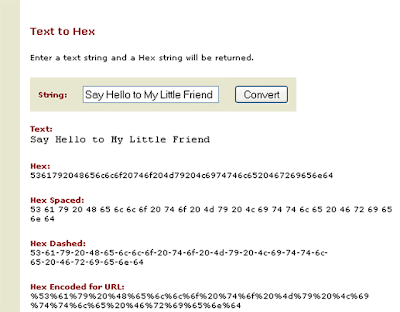
Use texttohex to unblock blocked site


Hello, dear readers. I had some issues with my job because of this fa***ing crisis. But I decided to come back to my favorite blog describing ways of blocked sites unblocking.
This issue became more important nowadays because a lot of people all over the world have lost their jobs and they are spending their time in the Internet.

And authorities block access for many sites that may help them to find a new job. How we may call them? F**ing a****les.

Sorry for such an introduction :-)

So, here's a trick:

1) Firstly you have to go to a webpage
http://www.swingnote.com/tools/texttohex.php

2) Replace the text "Say hello to my little friend" with URL of a blocked site that you wish to unblock
3) Click the button "Convert".

4) Copy converted code and put in the browser address area and push "Enter" button.

After that you should see the webpage that you wanted to unblock.

IMPORTANT!!!!!
This trick works only for one webpage, not for whole site. That is why you have to generate each page URL on your blocked site to access it.

As for me, I think this is very useful trick that may help you to access many blocked sites (to be correct - each blocked website page that is blocked)

Unblock blocked site and Enjoy!

Don’t use Proxy to unblock blocked site

In most cases people used to use Proxy Servers to access site blocked by ISP or administrator of a Net.


Usually they start using them because this is the most widespread method to unblock blocked site. In this post I would like to clear some old myth about proxies.

I’m sure that many of you already know what a proxy server is, so I won’t write about this once again. If you want to get any definition of it you can use any of your favorite Search Engine (e.g. Google).


It is all about truth that Proxy Servers cannot help you very much to unblock blocked site. However, many Internet users decided that this is the most convenient, and what the most important for them, free of charge way to unblock blocked site. But as you know nothing is free.

Personally, I had been using lots of proxy servers and programmes that apparently generate huge Proxy Lists. I didn't suppose that paid software and free software use the same proxy servers. What I’m talking about? Read the next paragraph to get the answer.

Most programmes generating Proxy Servers lists, if not all of them, use different algorithms of generating these lists, BUT they have the same Proxy Servers Lists that are available for free all over the Internet.

Talking about that we can assume that these Proxy Servers are not anonymous because a lot of users already know about them, and furthermore, they use them in the Internet for a long period of time.

Concluding, I want to say that this is the high time to understand that all free staff is not safe. By using Free Proxy Servers you risk to be caught for nothing because you cannot realize who used these lists and you do not know where these proxies had been banned and what for either. Any of Security organization dealing with Internet crime can easily identify your real IP address under Proxy Server’s one and find you in several days.

So, before the using of Free Proxy servers it is always a good idea to think about your personal security.

It must be added that software generating Proxy Servers lists also use random algorithm that changes proxy servers every particular period. Such software owners reassure their customers of security. They all lie because if proxy servers are not anonymous it does not matter if you change them all the time or not, your real IP address is visible for people hunting you.

On this sad note I won’t end. There are a lot of legal software that use pure anonymous servers. Most of them are difficult to find because they are created for big organizations rather than for Internet users.

You can check out weekly updated list of Hide IP Soft. I use one of software out there, SmartHide. This service provides personal IP address that is unique and fast (100 Mb/s), i.e. I use it privately, no one knows about this IP except me. It perfectly can unblock blocked site.

This service can be compared with anonymizer. But anonymizer is high-priced and provides very slow servers. But it provides Personal IPs too.

Feel free to comment regarding any issue that you might be interested in. I will assist you with pleasure.


Like this post? Why not to Subscribe to Unblock Blocked Site news by Email for FREE

7 ways to unblock blocked sites

I'm sure that you have tried a lot of ways already to unblock blocked sites. Many of them are useless but there are always actual new ones.

Why sites usually are blocked?

Government of many countries blocks sites because of different reasons:
- Sex;
- religion;
- political convictions;
- others.

They do not care about Internet users who are not even aware about these reasons. They just want to meet new people, to find a new friend or a darling.

Great "Countries-Blockers"

Saudi Arabia
They block everything about sex, religion, women, health, politics and pop culture. They even block access to websites that sell swimming or bathing suits.

China
They block websites that talk about sex, Tibet or Democracy.


What Social Sites can be blocked?

- Google News
- Typepad
- ebay
- Blogger blogs
- YouTube
- Facebook
- Bebo
- Myspace
- Orkut
- MySpace
- Pandora
- Bebo
- Photobucket
- Yahoo! Messenger
- AOL AIM
- Flickr
- others.

Actually, there are a lot of ways how to unblock sites. I have created my own list of 7 ways:

1 Type the IP number instead of the URL to unblock blocked sites.

2 Use an URL redirection service like tinyurl.com or snipurl.com to unblock blocked site.

3 Use Google Mobile Search - Choose the model of phone and start visiting the blocked sites. It works similar to standard browser. Google Mobile helps you to surf the blocked sites easily.

4 Use Mobile browsers to unblock blocked sites.

5 Use Free Online Anonymizers to unblock blocked sites.

6 Use Yahoo Babelfish or Google language tools to unblock blocked sites. All you need to do is to invoke the Google translate service with the same language pair like English to English. Assuming that Google is accessible in your school, you should be able to access any website with this method.

7 Use Unblock Blocked Site Software - Browse the Internet anonymously and unblock any blocked site with easy-to-use Unblock Blocked Site Software that does not use proxy servers.

You should understand that this is not the full list of ways that can help to unblock blocked sites.

If you have any other ways to add, you may comment below. I really appreciate any of your comment.


Like this post? Why not to Subscribe to Unblock Blocked Site news by Email for FREE